Most business owners do not wake up thinking about content management systems.
They think about leads, enquiries, bookings, sales, updates, staff, customers and whether their website is actually doing its job.
But behind every website that needs regular updates is a system controlling how the content is managed. That system is usually called a CMS, short for content management system.
Some websites use popular platforms like WordPress, Shopify, Wix or Squarespace. Others use a custom-built CMS designed specifically around the business, the website structure and the way the site needs to be managed.
At Site Ninjas Digital, we built NinjaCMS because too many business websites suffer from the same old problem: either the client has too much access and can accidentally wreck the site, or they have too little access and need a developer for every tiny change.
Neither is ideal.
A proper CMS should make website management easier, safer and more structured. It should give a business owner control without handing them the keys to break the foundations of the website.
That is where a custom CMS comes in.
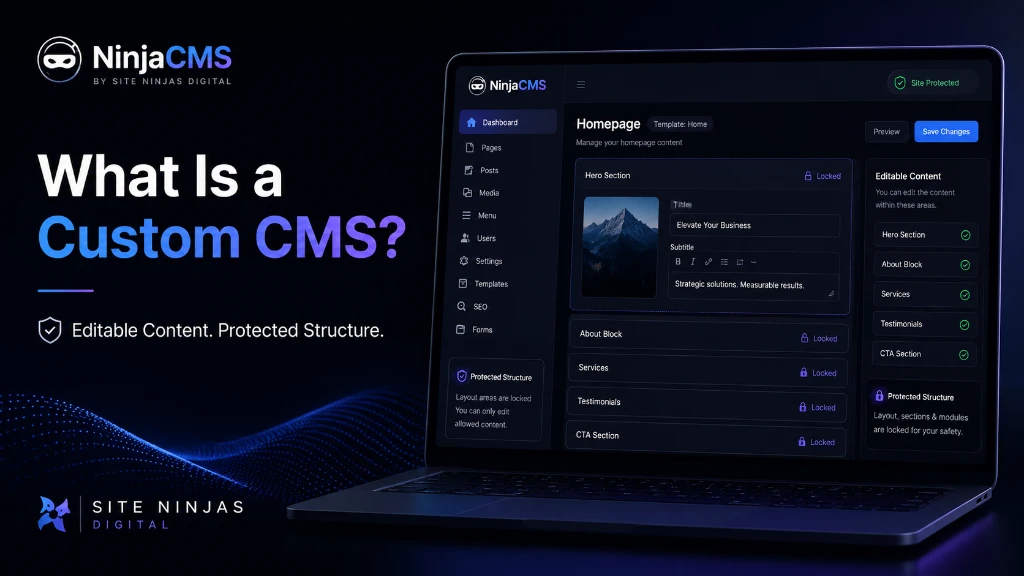
What Does CMS Mean?
CMS stands for Content Management System.
It is the part of a website that allows content to be added, edited and managed without needing to manually change the website code every time.
A CMS can allow a business to manage things like:
- website page text
- images
- blog posts
- service information
- FAQs
- team members
- testimonials
- case studies
- calls to action
- SEO titles and descriptions
- forms and enquiry pathways
In simple terms, the CMS is the control panel behind the website.
For a business owner, the goal should not be to have the most complicated CMS. The goal should be to have the right level of control.
A good CMS should make the important things easy and the dangerous things protected.
What a CMS Should Help You Manage
A good CMS should make it easy to manage important website content without putting the design, structure or technical foundations at risk.
What Is a Custom CMS?
A custom CMS is a content management system built specifically for a website, business model, workflow or digital platform.
Instead of forcing the business into a pre-made structure, a custom CMS can be designed around the actual website.
That means the dashboard, content fields, page types, editing permissions and management tools can all be created around what the business actually needs.
For example, a local service business may need to manage:
- service pages
- location pages
- project galleries
- enquiry forms
- customer reviews
- blog posts
- service FAQs
- before-and-after images
- SEO page titles
- meta descriptions
An ecommerce business may need something different.
A booking platform may need something different again.
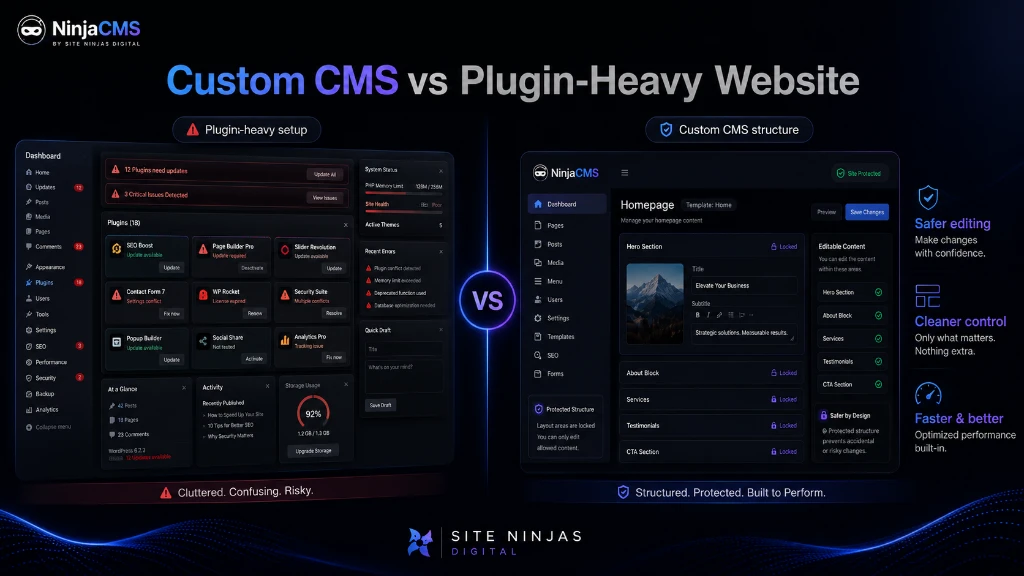
A custom CMS gives more control over how the website is built and managed, instead of relying on a large stack of plugins, templates and third-party tools.
That does not mean every business needs one. Some businesses are perfectly fine on WordPress, Shopify or another established platform.
But for businesses that want cleaner control, safer editing and a system built around their own website structure, a custom CMS can be a much better long-term foundation.
Why Do Many Businesses Struggle with Their Website CMS?
A lot of business websites become difficult to manage because the CMS was never properly planned.
The website might look fine on launch day, but six months later the cracks start to show.
Common problems include:
- the client cannot update important sections
- the client can update too much and accidentally breaks layouts
- plugins start conflicting
- the website becomes slower over time
- page structures become messy
- SEO fields are missing or badly handled
- developers are needed for simple content edits
- design consistency starts falling apart
- every new feature needs another plugin or workaround
This is where many traditional website builds go wrong.
A website should not just be a collection of pages. It should be a structured digital system that can be managed properly after launch.
The old way of handing a client a bloated dashboard and hoping for the best is lazy. It might be common, but it is not good enough.
The Problem with Giving Clients Too Much Access
One of the biggest mistakes in website management is giving a client unrestricted access to everything.
At first, it sounds helpful.
The client can edit anything. Move anything. Change anything. Install anything. Delete anything.
That freedom can become a problem quickly.
When too much access is given, a client may accidentally:
- break a page layout
- delete important sections
- upload oversized images
- change heading structures
- remove calls to action
- damage mobile layouts
- overwrite SEO settings
- install unnecessary plugins
- create inconsistent page designs
Most business owners are not web developers, and they should not have to be.
A plumber, builder, electrician, consultant, beauty salon, gym, accountant or local service provider should be able to update their website content without needing to understand layout systems, technical SEO, responsive design or plugin settings.
Too much access creates risk.
It is like giving someone the keys to the whole workshop when all they needed was access to one tool.
The Problem with Giving Clients Too Little Access
The opposite problem is just as frustrating.
Some websites are built so tightly that the business owner cannot change anything without asking a developer.
Need to update a service description? Ask the developer.
Need to change a staff photo? Ask the developer.
Need to add a testimonial? Ask the developer.
Need to update a call to action? Ask the developer.
Need to publish a blog? Ask the developer.
That slows everything down.
It also means the website becomes stale because small updates feel like a hassle. Over time, the business avoids updating the site altogether.
That is not good for SEO, conversion or customer trust.
A website should be alive. It should grow with the business. But it needs to grow in a controlled way.
The right CMS sits in the middle: enough access to manage content, not so much access that the site can be damaged.
The CMS Balance
Too Much Access
- Layouts get broken
- Settings get changed
- Pages become inconsistent
- SEO structure gets damaged
Too Little Access
- Every edit needs a developer
- Content gets outdated
- Updates become slow
- Website growth stalls
NinjaCMS gives controlled access where it matters.
Learn About NinjaCMSWhat Is NinjaCMS?
NinjaCMS is the custom content management system built by Site Ninjas Digital to give businesses safer website control.
It is designed to let clients manage the parts of their website they should control, while protecting the design, layout and technical structure that should not be casually changed.
In simple terms, NinjaCMS is built around this idea:
Give business owners control over their content, without giving them enough access to accidentally break the website.
That means the website can be built with a cleaner structure, fewer unnecessary moving parts and a dashboard that is tailored around the actual site.
For many businesses, this is a better approach than relying on a plugin-heavy setup where every feature depends on another add-on, another update and another possible point of failure.
Want a Website That Is Easier to Manage?
NinjaCMS gives businesses safer content control while protecting the design, layout and technical foundations that make the website perform.
Why NinjaCMS Is Different
NinjaCMS is not trying to be everything for everyone.
That is the point.
Many large CMS platforms are built to serve millions of different use cases. That flexibility can be powerful, but it can also make the system heavier and more complicated than many business websites actually need.
NinjaCMS is different because it is designed around structured business websites.
That means the CMS can be shaped around:
- service pages
- location pages
- project pages
- team profiles
- testimonials
- blog posts
- SEO content
- calls to action
- lead generation pathways
- image galleries
- custom business sections
Instead of giving the client a messy back end full of settings they do not need, NinjaCMS can provide a cleaner editing experience.
The client gets control where it matters.
The developer keeps control where structure matters.
That is the balance most business websites need.
Custom CMS vs WordPress
WordPress is one of the most widely used CMS platforms in the world. It can be a good choice for many websites, especially when it is built properly, maintained properly and not overloaded with unnecessary plugins.
But WordPress can also become messy.
The issue is not always WordPress itself. The issue is often how it is used.
A typical WordPress website may rely on:
- themes
- page builders
- plugins
- plugin extensions
- security tools
- caching tools
- SEO tools
- form plugins
- update management
- third-party add-ons
That can work, but it needs discipline.
When it is not managed properly, the site can become slow, fragile or awkward to maintain.
A custom CMS takes a different approach.
Instead of adding plugin after plugin to make the website do what it needs to do, the CMS can be built around the website from the start.
That can mean:
- cleaner dashboard structure
- fewer unnecessary features
- safer editing permissions
- more controlled design consistency
- less plugin dependency
- stronger custom workflows
- better alignment between the CMS and the website architecture
This does not mean WordPress is bad.
It means WordPress is not always the best answer.
For a simple brochure website, WordPress may be perfectly fine.
For a business that wants a cleaner, safer, more structured website system, a custom CMS like NinjaCMS can be a stronger option.
Tired of Plugin Bloat and Website Maintenance Issues?
If your current website is difficult to update, overloaded with plugins or fragile to manage, Site Ninjas Digital can help you rebuild with a cleaner custom CMS foundation.
Custom CMS vs Website Builders
Website builders can be useful for very small businesses, side projects or early-stage ideas.
They are usually designed to make websites quick and accessible.
But there is a trade-off.
Website builders can become limiting when a business needs:
- stronger SEO structure
- better speed control
- custom layouts
- more advanced content management
- cleaner code
- custom integrations
- service-area landing pages
- scalable content structures
- more control over conversion pathways
The problem with many website builders is that they are made for convenience first.
That is fine at the beginning.
But once a business starts taking its website seriously as a lead generation asset, convenience is not enough.
A proper business website needs structure, performance, control and room to grow.
A custom CMS can provide that foundation.
Why Safe Website Editing Matters
Safe website editing matters because one bad edit can damage more than just the look of a page.
It can affect:
- user experience
- mobile layout
- page speed
- search visibility
- enquiry rates
- brand trust
- internal linking
- heading structure
- conversion flow
A business owner should be able to update content without worrying that one wrong click will ruin the page.
That is why protected editing is so important.
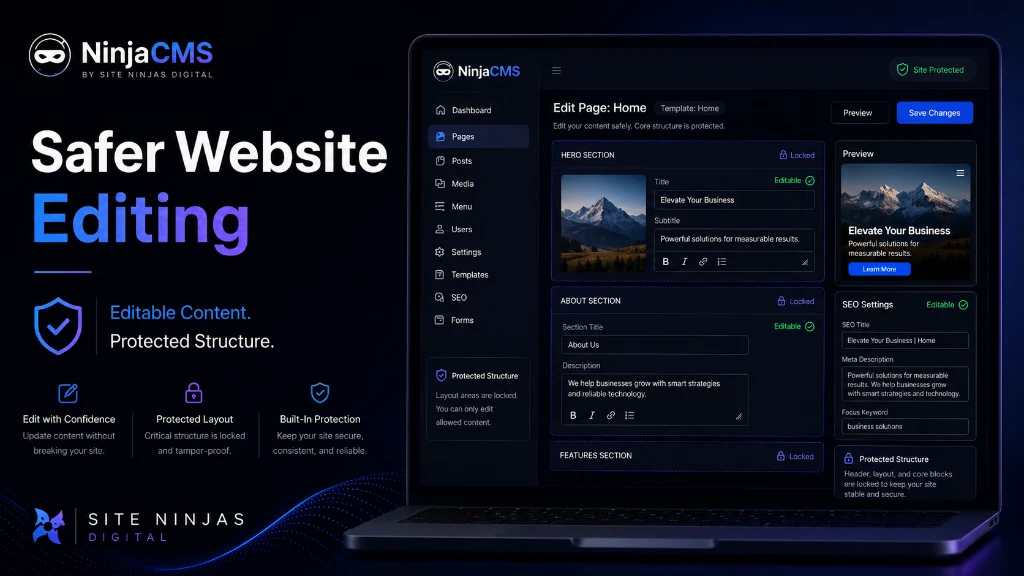
With a safer CMS setup, the editable parts of the website are controlled.
For example, a client may be able to update:
- page text
- images
- service descriptions
- FAQs
- testimonials
- blog content
- calls to action
But they may not be able to accidentally destroy:
- global layout
- mobile responsiveness
- header structure
- footer structure
- design components
- technical SEO foundations
- core page templates
That is not about restricting the client for the sake of it.
It is about protecting the website.
A good CMS should make the safe path the easy path.
How a Custom CMS Supports SEO
A custom CMS can support SEO by making the website structure easier to control.
SEO is not just about writing keywords into pages.
The old-school basics still matter: clear pages, clean structure, relevant headings, strong internal links, useful content and a site that loads properly.
A custom CMS can support SEO by allowing better control over:
- page titles
- meta descriptions
- heading hierarchy
- URL structures
- service page templates
- location page templates
- blog categories
- internal linking sections
- schema opportunities
- image alt text
- call-to-action placement
- content modules
- indexable page structures
This is especially useful for service-based businesses.
A plumber, electrician, builder, fire safety company, consultant, landscaper or digital agency may need different service pages and location pages structured in a consistent way.
If those pages are built manually with no system, they become difficult to scale.
If they are built inside a controlled CMS structure, they can be managed more cleanly.
That is where a custom CMS becomes more than just a back-end tool.
It becomes part of the SEO foundation.
How NinjaCMS Helps Service-Based Businesses
Service-based businesses need websites that explain what they do, where they do it and why customers should trust them.
That sounds simple, but many service websites get it wrong.
They have vague pages, weak calls to action, thin service descriptions and no proper local structure.
NinjaCMS can help service businesses manage structured content such as:
- main service pages
- sub-service pages
- suburb or location pages
- FAQ sections
- testimonials
- project examples
- before-and-after galleries
- contact forms
- enquiry buttons
- blog articles
- trust sections
- service-area content
For businesses across Sydney, the Northern Beaches and wider Australia, that structure matters.
A website for a Balgowlah-based business should not be built the same way as a national ecommerce brand. A local service business needs a clear structure that supports local trust, local relevance and lead generation.
NinjaCMS gives that structure a safer place to live.
How NinjaCMS Helps Growing Businesses
A small website might start with five or six pages.
But as a business grows, the website may need more.
It may need:
- new service pages
- new location pages
- new blog content
- landing pages
- case studies
- team profiles
- campaign pages
- quote forms
- downloadable resources
- new enquiry pathways
- additional SEO content
If the CMS is messy, growth becomes painful.
Every new page feels like a patch job.
Every update creates more inconsistency.
Every new feature adds more complexity.
A custom CMS can make growth cleaner because the structure is planned properly.
NinjaCMS is designed to help businesses build websites that can grow without turning into a tangled mess.
That matters because a website should not need to be rebuilt every time the business evolves.
Build a Website System, Not Just a Website
From structure and SEO foundations to safer content management, NinjaCMS is designed to support long-term website growth.
When Is a Custom CMS the Right Choice?
A custom CMS may be the right choice when a business wants more control, better structure and fewer platform headaches.
It can be a strong fit if:
- your current website is difficult to update
- your website relies on too many plugins
- your pages are inconsistent
- your team needs safer editing access
- your website needs better SEO structure
- you are planning a serious rebuild
- you need custom page types or workflows
- you want a cleaner long-term website foundation
- you want your site to grow beyond a basic brochure website
A custom CMS is especially useful when the website is an important business asset.
If your website is expected to generate enquiries, support sales, rank in Google, educate customers and represent your brand properly, then the CMS underneath it matters.
Is a Custom CMS Right for Your Business?
A custom CMS may be the right fit when your website needs safer editing, better structure and more room to grow.
When Is a Custom CMS Not Needed?
A custom CMS is not always necessary.
That is important to say.
If a business only needs a very basic one-page website, a simple website builder may be enough.
If a business already has a well-built Shopify store, Shopify may remain the right platform.
If a business has a properly managed WordPress website that is fast, secure and easy to update, there may be no urgent need to change.
The right platform depends on the job.
A proper agency should not force every business into the same system just because it is convenient for the agency.
At Site Ninjas Digital, the goal is to recommend the right foundation for the business.
Sometimes that may be NinjaCMS.
Sometimes it may not be.
But when a business needs a safer, cleaner, more controlled website management system, NinjaCMS becomes a serious option.
Why Site Ninjas Digital Built NinjaCMS
Site Ninjas Digital built NinjaCMS because many business websites are still being managed in a broken way.
Too many websites are either:
- overly fragile
- overloaded with plugins
- hard for clients to update
- risky for clients to edit
- slow to maintain
- poorly structured for SEO
- too dependent on developers for simple changes
NinjaCMS was created to solve that problem.
The idea is simple: build websites that look professional, perform properly and give businesses safer control over their own content.
A website should not just look good on launch day.
It should remain manageable, structured and useful long after the launch.
That is the difference between a basic website and a proper digital system.
Frequently Asked Questions
What does CMS stand for?
CMS stands for Content Management System. It is the system used to manage website content such as pages, images, blogs, testimonials, service information and SEO fields.
What is a custom CMS?
A custom CMS is a content management system built specifically around a website, business or digital platform. It can be tailored to the way the website needs to be managed instead of forcing the business into a generic structure.
Is NinjaCMS a WordPress alternative?
Yes, NinjaCMS can be used as a WordPress alternative for businesses that want a cleaner, more controlled and less plugin-dependent website management system.
Can clients update their own content in NinjaCMS?
Yes. NinjaCMS is designed to give clients safer control over the parts of the website they should be able to edit, such as text, images, blogs, FAQs, testimonials and service information.
Can NinjaCMS help with SEO?
NinjaCMS can support SEO by keeping website content, page structures, metadata, headings, service pages and internal content sections more controlled and consistent.
Is a custom CMS suitable for small businesses?
A custom CMS can suit small businesses when the website is important for lead generation, search visibility and long-term growth. For very simple websites, a lighter platform may be enough.
Is NinjaCMS only for Sydney businesses?
No. Site Ninjas Digital works with businesses across Sydney, the Northern Beaches and wider Australia, with experience across Australia, New Zealand and the United Kingdom.
Build a Website You Can Manage Safely
If your current website is difficult to update, overloaded with plugins or no longer supporting your business properly, Site Ninjas Digital can help you rebuild it with a cleaner foundation.
